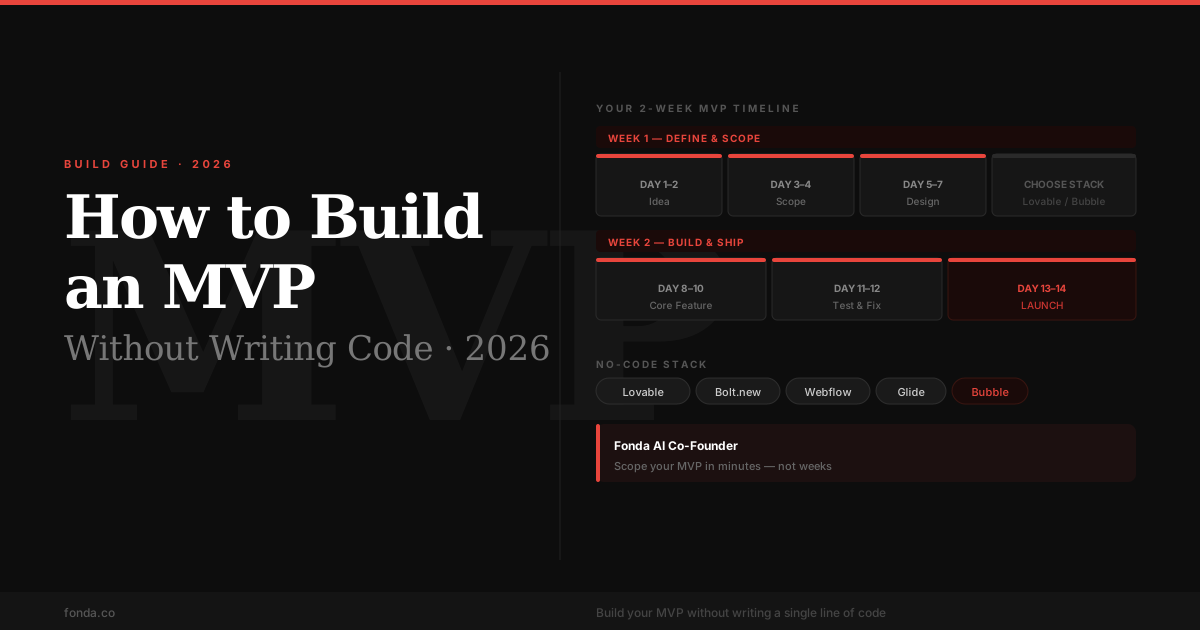
How to Build an MVP for Your Startup in 2026 (Without Writing Code)
Most first-time founders either overbuild (six months on a product nobody asked for) or never ship at all. This guide covers the four types of MVP, how to pick the right one, the no-code tools that actually work in 2026, and the two-week timeline that gets you from idea to live product.
Quick Answer
To build an MVP without code in 2026:
- 1. Define your hypothesis: one sentence describing what you believe and what you're testing
- 2. Pick your MVP type: Concierge, Landing Page, Wizard of Oz, or No-Code App
- 3. Identify your one core feature: cut everything else without mercy
- 4. Choose the right tool: Lovable or Bolt.new for apps, Webflow for content, Glide for mobile, Bubble for complexity
- 5. Build in 2 weeks: one week to scope and design, one week to build and ship
- 6. Measure one metric: activation rate, not signups
The word "minimum" in Minimum Viable Product is doing a lot of work. Every founder thinks they've cut enough. They haven't. The point of an MVP is to find the fastest, cheapest way to test whether your core assumption is true, not to build a smaller version of your full product. That test might not require any code at all.
Before we get into tools and timelines, the most important question is structural: what type of MVP does your idea actually call for? Choosing the wrong type adds months of unnecessary work.
What an MVP Actually Is (And What It's Not)
Eric Ries defined the MVP as "the version of a new product which allows a team to collect the maximum amount of validated learning about customers with the least effort." Note what's absent from that definition: the word "product." The MVP is a learning vehicle. The product comes later, once you know what to build.
An MVP is not a beta. A beta is a nearly-finished product with rough edges. An MVP may be a spreadsheet, a Typeform, a Notion page, or a Figma mockup linked to a Stripe checkout. What matters is that it tests the central hypothesis.
An MVP is not any of these
The other common mistake is confusing an MVP with market validation. Validation comes before the MVP. It's how you confirm the problem is real. The MVP tests whether your specific solution to that problem works. If you skip validation and go straight to building, you risk building the right thing for a problem nobody actually has.
The 4 Types of MVP: Which One Fits Your Idea?
Most guides skip straight to tools. But the type of MVP you build depends on what you're trying to prove, and the right type can save you weeks of build time. Here are the four types and when each applies.
Concierge MVP
You need to test whether users value the outcome, not the mechanism
Deliver the value manually. If your idea is an AI meal planner, email personalized meal plans yourself. If it's a matching platform, make the matches yourself over WhatsApp. You're the algorithm.
Real example
Zapier started by manually connecting apps for their first customers. Food on the Table sent grocery lists by hand before writing code.
Strengths
Zero build cost. Maximum learning speed. Direct customer contact reveals real pain points.
Limitations
Doesn't scale beyond ~20 customers. Customers may behave differently when they know a human is doing the work.
Landing Page MVP
You need to test demand before building anything
Build a page that describes the product and measures intent: a signup form, a waitlist, or a checkout button. The product doesn't need to exist yet. Buffer tested demand this way; Dropbox used a demo video.
Real example
Dropbox's 2007 explainer video generated 75,000 signups before a single line of app code was written.
Strengths
Cheapest possible test. Real email addresses are a real signal. Fast to build (1–3 days).
Limitations
Signup intent is weaker than purchase intent. You don't learn whether users will actually use the product.
Wizard of Oz MVP
Your product involves automation or AI, but you need to test the UX before building the engine
Build a realistic front-end that looks automated. Behind the scenes, a human performs the automated action. Users think it's a working product; you're manually doing the work it will eventually do.
Real example
Aardvark (acquired by Google) routed questions to experts manually while developing their matching algorithm.
Strengths
Tests the full user experience. Reveals friction points in the flow. No ML/AI infrastructure needed upfront.
Limitations
More build effort than a landing page. Manual fulfillment has a ceiling. Requires careful team coordination.
No-Code App MVP
You need a functional product users can actually use, but don't have engineering resources
Use no-code tools to build a working app with real data, real user accounts, and real core functionality. The 2026 no-code stack makes this viable for most startup ideas.
Real example
This is where most first-time founders in 2026 end up, and where the tools in the next section come in.
Strengths
Real product, real data, real usage patterns. Can scale past the manual stage.
Limitations
More time-intensive than the other three types. Can still be over-scoped if you're not disciplined.
How to Define Your One Core Feature
The hardest part of building an MVP is deciding what not to build. Every founder has a features list. The discipline is cutting it to one.
Here's the framework: write down your hypothesis in this format: "We believe [specific customer type] will [specific action] because [specific reason]." The core feature is whatever directly tests that hypothesis. Everything else is irrelevant to the test.
Example
"We believe busy parents will pay $15/month for a tool that plans their weekly meals in under 60 seconds because current meal planners take too long to configure."
The core feature: a 60-second meal plan generator. Not a shopping list, not a recipe database, not a nutritional tracker, not user profiles. One feature. Test that first.
A useful stress test: apply the "if we removed this, could we still run the experiment?" filter to every feature on your list. Log-in system? Probably yes, so start with a shared link. Onboarding flow? Yes, so explain it in an email. Payment processing? Depends: if charging is the test, keep it; if usage is the test, fake it with a free trial.
Features to cut from almost every MVP
Fonda's MVP planning tool walks you through this scoping process step by step. It asks you to state your hypothesis, then filters your feature list against it, flagging anything that doesn't directly test the core assumption. Most founders find they cut 60–70% of their planned scope.
The 2026 No-Code Stack: Tools Compared
The no-code landscape has changed significantly in the last two years. AI-native builders like Lovable and Bolt.new now generate working React applications from a prompt. These are deployable apps, not mockups or templates. This is the default starting point for most non-technical founders in 2026.
Here's an honest comparison of the five tools worth knowing. The right choice depends entirely on your MVP type and how much complexity your core feature actually requires.
| Tool | Best for | Complexity | Cost | Time to launch |
|---|---|---|---|---|
| LovableTop pick | SaaS apps, dashboards, internal tools | Low: prompt-to-app AI | Free tier, then $25/mo | 1–3 days |
| Bolt.new | Web apps with custom UI | Low: AI generates React code | Free tier, then $20/mo | 1–3 days |
| Webflow | Content sites, landing pages, marketing MVPs | Medium: visual builder | Free tier, then $14/mo | 2–5 days |
| Glide | Mobile apps from spreadsheet data | Low: spreadsheet as backend | Free tier, then $49/mo | 1–2 days |
| Bubble | Complex web apps, marketplaces, multi-user platforms | High: full visual logic builder | Free tier, then $29/mo | 5–14 days |
Lovable: the default choice for most founders
Lovable connects to a real backend (Supabase), generates actual React code, and deploys to a live URL. You describe what you want in natural language, and it builds it. The code is yours to export. For a SaaS MVP, a client portal, or a simple tool, start here. The main limitation is that complex conditional logic still requires some iteration with the AI.
Bolt.new: for founders comfortable directing an AI agent
Bolt.new is faster than Lovable for small, specific features but requires more precise prompting to get good output. It generates clean React or Vue code and handles deployment. Best used when you know exactly what you want and can describe it clearly. It struggles with multi-page apps that have complex state.
Bubble: when your MVP really needs complex logic
Bubble has the steepest learning curve of any tool here, but it handles multi-sided marketplaces, complex workflows, and role-based permissions in a way the AI builders don't yet match. If your MVP involves multiple user types (buyers and sellers, employers and candidates), Bubble is worth the extra week of learning. Expect 5–14 days to build a real MVP.
Webflow: for content-first or marketing-led MVPs
If your MVP is a landing page, a content site, a portfolio, or a product that primarily needs strong visual design and a CMS, Webflow is the best tool. It's the wrong choice for functional SaaS apps. Use it when the MVP is proving demand, not building functionality.
Glide: for mobile-first MVPs built on existing data
Glide turns a Google Sheet or Airtable into a mobile app in hours. The sweet spot: directories, inventory trackers, field team tools, or any MVP where the data already exists in a spreadsheet. If you have the data and need a mobile interface, nothing ships faster.
Fonda tip: Your personal co-founder can help you scope which tool is right for your specific MVP based on your core feature, target user, and timeline. Most founders over-index on Bubble when Lovable would ship three times faster for their use case.
Your 2-Week MVP Build Timeline
Two weeks is the right constraint. Shorter and you'll cut corners on the core feature. Longer and you'll start adding scope. The timeline below assumes you're working on this part-time (evenings and weekends). If you're full-time, compress it to 5–7 days.
Define & Scope
Day 1–2
State your hypothesis
Write one sentence: 'We believe [customer] will [action] because [reason].' This is what you're testing.
Day 3–4
Pick your one core feature
List every feature you want. Cross out everything except the one that directly tests the hypothesis.
Day 5–6
Choose your tool
Match your MVP type to the right no-code tool. Don't over-engineer. Use the simplest stack that works.
Day 7
Build your first screen
Get something on screen by end of day. Visual progress keeps momentum and exposes false assumptions early.
Build & Ship
Day 8–10
Build the core feature
Skip settings, profiles, and edge cases. Build the core feature and stop.
Day 11–12
Test with 5 real people
Find people in your target customer segment, not friends. Watch them use it without explaining anything.
Day 13
Fix critical blockers only
Address anything that prevents users from completing the core action. Ignore everything else.
Day 14
Launch publicly
Post in relevant communities, email your waitlist, and launch on Product Hunt.
What to do if you fall behind
The only acceptable reason to extend the timeline is discovering that your core feature was scoped wrong. If you realize on Day 10 that your hypothesis needs a different test, restart the scoping step. Don't add features to paper over a structural problem.
The unacceptable reason to extend: "it's not ready yet." An MVP is never fully ready. Ship it before you're comfortable, or you've already missed the point.
How to Know If Your MVP Is Working
The most common post-launch mistake is measuring the wrong thing. Signups are not a signal. Page views are not a signal. People telling you "this looks cool" is not a signal. The only signal that matters is whether users complete the core action your MVP is built around.
This is called your activation rate: the percentage of users who reach the moment where they get real value from the product. Define that moment before you launch, and measure only that.
Activation Rate
% of signups who complete your core action
Good: >30%. Strong: >50%.
The only metric that tells you whether users see the value you think you're delivering.
Return Rate
% of activated users who come back within 7 days
Good: >20%. Strong: >40%.
Signifies habitual value. One-time utility tools have lower thresholds; daily tools need higher.
Qualitative Signal
Would you be 'very disappointed' if this went away?
Strong if >40% say 'very disappointed'.
Sean Ellis test. Don't run it with fewer than 40 respondents; the signal is noisy below that.
Willingness to Pay
Did users try to pay, ask about pricing, or request a plan?
Any unsolicited payment intent is a strong signal.
Enthusiasm without payment intent means the value isn't strong enough. Even a $5 charge reveals real conviction.
What low activation actually means
Low activation rate does not automatically mean the idea is bad. It usually means one of three things:
- → The wrong users are signing up (targeting problem)
- → The path to the core action is too long or confusing (UX problem)
- → The core action doesn't deliver the expected value (product problem)
Talk to 5 users who didn't activate. Ask them to walk you through what they did and where they stopped. The answer is almost always in those conversations.
When to Stop Iterating and Raise Money (or Launch)
The hardest decision after launching an MVP is knowing when you've learned enough. There are two traps: quitting too early (one bad week of data and you pivot) and staying too long (six months of iteration on an MVP that should have been replaced by a real product months ago).
Here's a useful framework: your MVP has done its job when you can answer three questions with data.
Is the problem real?
Users describe the problem unprompted in interviews. They've tried multiple alternatives. They spend money or significant time on workarounds.
Does your solution work?
Activation rate above 30%. Return visits within 7 days. Qualitative responses describe genuine relief or saved time.
Will people pay?
Payment intent, even from a small cohort. Users asking about pricing, or paying without being prompted.
When all three are yes: stop iterating on the MVP and start building the real product. This is also the point where a fundraise makes sense: you have evidence, not only a hypothesis. Investors at pre-seed stage are fundamentally buying the evidence your MVP produced.
When only one or two are yes: keep iterating, but change only one thing at a time. If the problem is real but your solution doesn't activate users, that's a UX or positioning problem. If users activate but don't pay, that's a value or pricing problem. Isolate the variable before changing it.
The decision to raise comes down to timing as much as traction. Raising too early means giving up equity before you know what the business actually is. Raising too late means funding growth yourself while competitors move faster. The right time is when you have enough signal to know you're building the right thing, but not enough resources to build it at the scale the market demands.
If you're unsure whether your current signal is strong enough to raise, Fonda's traction analysis walks you through the data you have and benchmarks it against what investors typically want to see at your stage. It won't make the decision for you, but it surfaces the gaps.
Free, no account required
Scope your MVP
Describe your startup idea and get a scoped MVP plan (core feature, MVP type, and a tool recommendation) in under two minutes.
Frequently asked questions
How long does it take to build an MVP?+
A focused MVP built with no-code tools typically takes 2–4 weeks. The bottleneck is almost never the build itself. It's the scoping decision: agreeing on the single core feature and resisting the urge to add more. Founders who spend a week defining scope before touching any tool consistently ship faster than founders who start building immediately.
What is the cheapest way to build an MVP?+
The cheapest MVP is a Concierge MVP: you manually deliver the value your product would automate, using email, spreadsheets, or even phone calls. There is zero build cost. The next cheapest is a no-code landing page with a waitlist (under $20/month using tools like Webflow or Carrd). Only move to a full no-code app (Bubble, Glide) when manual delivery can no longer scale to test your hypothesis.
What should an MVP include?+
An MVP should include exactly one core feature: the specific action that creates value for the user and tests your central hypothesis. Everything else is scope creep. No onboarding wizard, no settings page, no social sharing, no dashboard unless the dashboard is the product. Ask: 'If we removed this feature, could we still test whether users want what we're offering?' If yes, cut it.
What is the difference between an MVP and a prototype?+
A prototype is a simulation: it looks like the product but doesn't work. An MVP is functional. Real users take real actions and get real value (or don't). Prototypes test whether the concept makes sense to users. MVPs test whether users will change their behavior for it. Both are useful, but a prototype is not a substitute for shipping something that works.
Do I need to code to build an MVP?+
No. In 2026, the no-code stack is mature enough to build fully functional web apps, mobile apps, marketplaces, and SaaS tools without writing code. Lovable and Bolt.new use AI to generate working React apps from a prompt. Bubble handles complex logic and databases. Glide turns spreadsheets into mobile apps. The only MVPs that genuinely require code are those with real-time infrastructure needs, custom ML models, or hardware integrations.
Related reading
10 Startup Idea Validation Mistakes
Validate your idea before you build anything
First-Time Founder Checklist
Everything you need to do before and after the MVP
Why Startup Ideas Fail Before They Launch
The patterns that kill ideas in the pre-MVP stage
How to Write a Business Plan for a Startup
When the MVP is done, this is what investors want next